Innovative solutions background

GPU Infrastructure Operations

Managing Your Lab's GPUs?
Sound Familiar?

No Visibility into Resources

You can't tell which GPUs are in use and which are idle

Resource Hogging & Delays

When one user monopolizes GPUs, everyone else's research stalls

Manual Management Limits

Tracking servers with spreadsheets leads to slow incident response

Low Resource Utilization

Your GPUs aren't reaching their full potential

GIGAFLOPS solves all of these problems

Real-time Unified Dashboard

Monitor all GPU, CPU & memory status on a single screen in real time

Slurm Auto-Scheduling

Fair resource allocation and queue management to maximize research efficiency

15-Second Fault Detection

PRISM monitors 24/7 and alerts you immediately on anomalies

Maximize GPU Utilization

Unified cluster means zero idle resources and maximum ROI

Explore GIGAFLOPS Core Services Explore

6 Nodes × 8 GPUs = 48 GPUs — Compare individual operation vs Slurm unified scheduling in real time

Elapsed 0:00 | Jobs 0

Individual Servers

Without Slurm
0%

Queue 0

-Avg Wait
0Done
0Waiting
VS

Slurm Unified Pool

With Slurm
0%
Slurm Controller

Queue 0

-Avg Wait
0Done
0Waiting

Scheduling Activity

Click each feature to explore!

NVIDIA Omniverse

Visualizing
the Data Center

Analyze thermal flows inside server rooms with 3D CFD simulation.
Real-time integration with NVIDIA Omniverse-based digital twin.

Tech Demo Videos

Watch CFD simulations and Omniverse digital twin in action

NVIDIA Omniverse CFD

CFD Thermal Simulation

Visualize thermal flows inside server rooms in 3D to analyze cooling efficiency.

Digital Twin PRISM Integration

3D Server Click → Real-time Status Popup

Click a server in the Omniverse scene to see real-time PRISM data in a popup.

GIGAFLOPS by the Numbers

0

sec

Real-time fault detection & alert speed

0

+

Servers (nodes) built & managed

0

%+

GPU uptime maintained

0

%+

Infrastructure cost reduction

0

%+

Loss cost reduction

0

%

Cluster scheduling conflict rate

Complex Infrastructure, 4 Simple Steps

From expert consulting to 24/7 integrated monitoring — GIGAFLOPS delivers end-to-end.

1

Consulting

Requirements analysis &
assessment

2

Custom Build

Optimized hardware &
Slurm design

3

Deployment

Rapid on-site installation
& stabilization

4

Monitoring

24/7 AI-powered monitoring
& fault detection via PRISM

Proven Tech Stack

Infrastructure built with globally leading technologies

NV
NVIDIA Omniverse
Digital Twin · Visualization
SL
Slurm
Cluster Scheduling
PM
Prometheus
Metric Collection · Monitoring
PR
PRISM
Unified Monitoring Platform
DC
Docker
Container Orchestration
K8
Kubernetes
Auto Deployment · Scaling

Infrastructure Built by GIGAFLOPS

Real customer cases proving our capabilities

AI·HPC Cluster

Yangjae AI Hub — GPU Cluster Build

H100 GPU-based AI training cluster with Slurm scheduling and PRISM real-time monitoring integration

13
GPU Nodes
24/7
Real-time Monitoring
Coming Soon

Next Case Study

New customer cases will be added here

TBD

Frequently Asked Questions

Any Linux-based server can be integrated with just a Node Exporter installation. We support GPU servers (NVIDIA), IPMI/BMC-enabled servers, and Slurm clusters. Currently monitoring 150+ servers simultaneously.
Depending on scale, it typically takes 2-4 weeks from hardware arrival to Slurm cluster installation and stabilization. We handle everything end-to-end from consulting to monitoring.
Yes. PRISM operates independently and is based on Prometheus + Node Exporter, so it integrates with your existing infrastructure by simply installing agents.
It runs on workstations with NVIDIA RTX GPUs. We are also preparing browser-based 3D scene viewing via web streaming.

Why GIGAFLOPS?

Maximize GPU efficiency — from server delivery to remote monitoring, all-in-one

Area DIY · Individual Tools GIGAFLOPS Integrated Solution
Resource ManagementManual scheduling, GPU idle time Auto-scheduling for 100% GPU usage, zero idle
Real-time MonitoringBuild Grafana yourself, install plugins separately PRISM proprietary — GPU/IPMI/Slurm built-in
Server Location TrackingNot supported 3D visualization, locate assets in 10 seconds
Auto Alert SystemManual dashboard checks, delayed response 15-second auto alert, immediate response
Digital Twin · CFDNot supported NVIDIA Omniverse thermal simulation
Deployment & OperationRequires in-house team, recovery takes months One-stop build + monitoring, recovery in days

Trusted by Leading Institutions

GIGAFLOPS News

View All +

The Optimal AI Infrastructure
Starts with GIGAFLOPS.

From expert consulting to deployment and monitoring — all in one place.

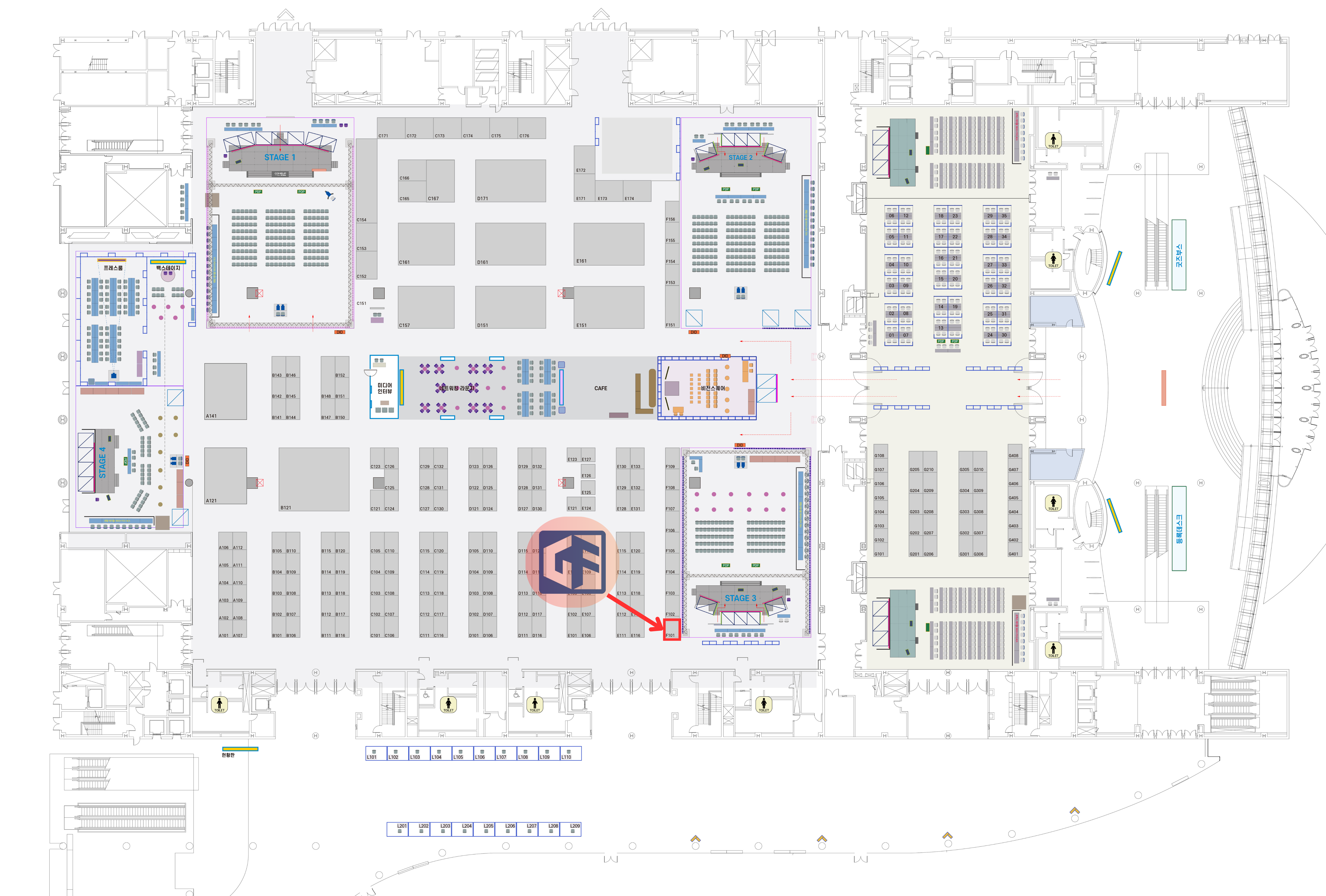
Booth layout

Contact GIGAFLOPS

Our HPC experts will get back to you promptly.